Cloud migrations at lightspeed, on an opinionated agent harness
From an existing application to deployed infrastructure in minutes
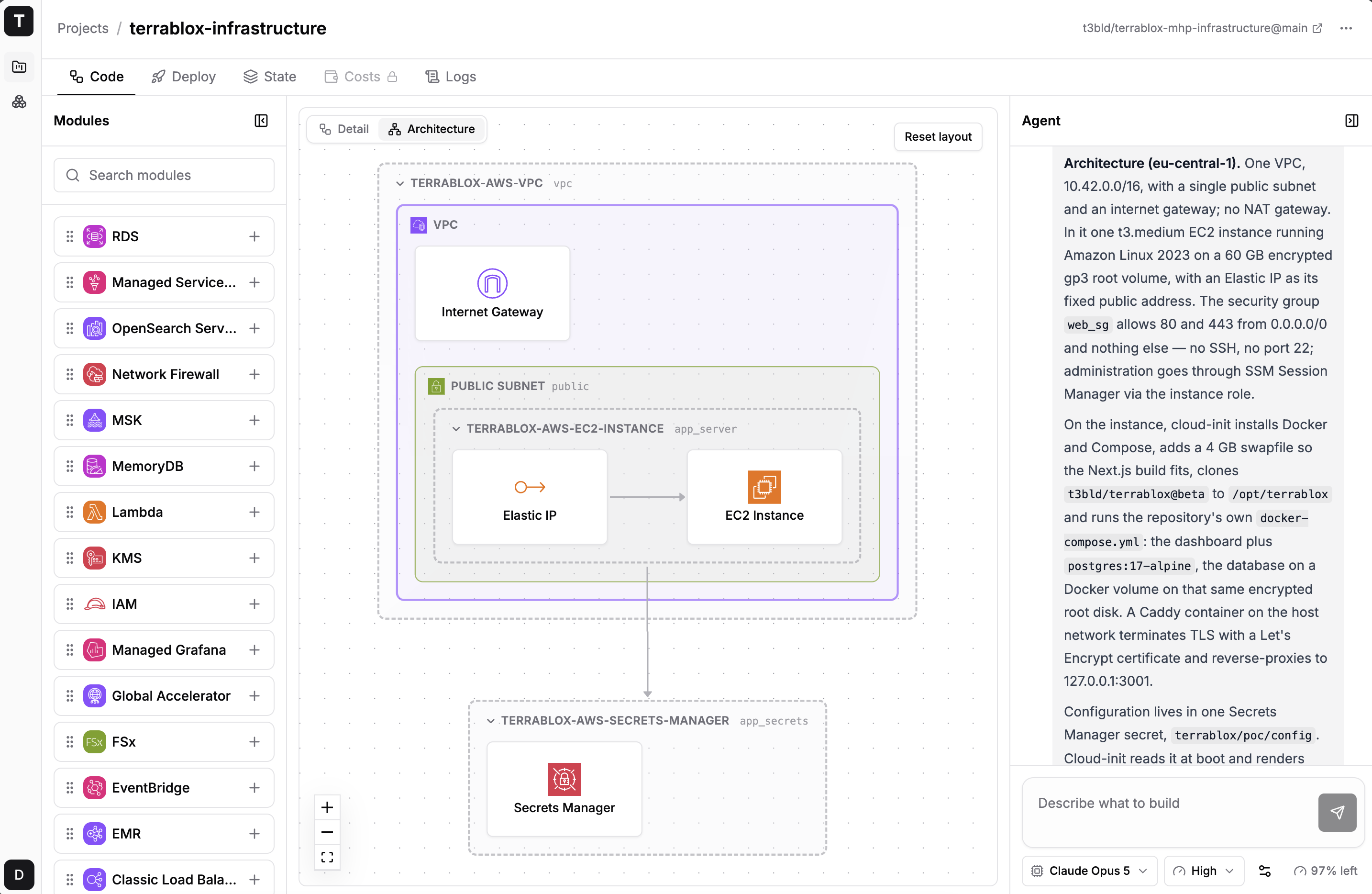
The agent reads the application repository and documentation, identifies the requirements it finds, composes the required infrastructure and walks you through the cloud setup.
- 1Identifyor describe the requirements
The agent harness comes assembled
An agent is only as good as the system around it. Terrablox gives your agent everything it needs to get the job done and works out of the box.
What goes in
Application repository
Documentation
Prompts
Agent harness
Requirements Engineering
Agent loop
repeats- 1Reads
- 2Calls operation
- 3Verifies result
- 4Result goes back
- Context
- Tools
- Memory
- Guardrails
- Observability
Module library
Best practices
Governance rules
What comes out
Infrastructure
Architecture decisions
Cost calculation
See what the agent built and understand why
Reviewing generated code means digging through hundreds of lines to find what matters. See what the agent is actually doing in a human-readable way.
Curated module library the industry already runs in production
Stop generating infrastructure from scratch. Assemble migrations from curated, production-proven Terraform modules for predictable deployments and consistent quality.
50 modules
 Certificate Manager
 Application Load Balancer
 API Gateway
 App Runner
 AppConfig
 AppSync
 EC2 Auto Scaling
 Batch
 CloudFront
 CloudWatch
 Datadog Forwarders
 DMS
 DynamoDB
 EC2
 ECR
 ECS
 EFS
 EKS
 EKS Pod Identity
 ElastiCache
 Classic Load Balancer
 EMR
 EventBridge
 FSx
 Global Accelerator
 Managed Grafana
 IAM
 KMS
 Lambda
 MemoryDB
 MSK
 Network Firewall
 OpenSearch Service
 Managed Service for Prometheus
 RDS
 Aurora
 RDS Proxy
 Redshift
 Route 53
 S3
 Secrets Manager
 Security Group
 SNS
 SQS
 SSM Parameter Store
 Step Functions
 Transit Gateway
 VPC
 VPN Gateway
 WAF
# clone, then:
$ pnpm quickstart

# dashboard on http://localhost:3001